Posts

Showing posts with the label docker

Deploy a Next.js Application on Azure Web App ( Part 1)

Image
Today, we are going to deploy a very simple web application build using Next.JS framework on Microsoft Azure Web App. This blog is split into two parts - Part 1: covers local web app development and deployment to azure web app using local machine. Part 2: covers deployment using Gitlab CI Prerequisites Before starting, ensure you have the following prerequisites: Azure Account Subscription : If you don't have one, you can sign up for a free account here . Node.js and NPM : Make sure Node.js and NPM are installed on your local machine. Download them here . Git and Azure CLI : Install Git and the Azure CLI. Git can be found here and Azure CLI here . Docker : You’ll need Docker for building and running your Next.js app in a container. Get it here . (It is optional, we can build image directly on azure also) Table of Contents Setup Boilerplate Repo Build Docker Image (optional) Create an Azure Web App Deploy Web App using Azure CLI Step 1: Setup Repository To get started, yo...
Setup Docker Engine on Windows using WSL2

Image
Steps to setup docker on Windows 10/11 system without installing Docker Desktop application, which is just a GUI for docker. First, you need to install WSL (Windows subsystem for Linux) if not already installed - wsl --install Note: It will install ubuntu linux as default linux flavour. If you need to check and install any other use below command:          wsl --list --online          wsl --install kali-linux Next, install docker using below commands # Add Docker's official GPG key: sudo apt-get update sudo apt-get install ca-certificates curl gnupg sudo install -m 0755 -d /etc/apt/keyrings curl -fsSL https://download.docker.com/linux/ubuntu/gpg | sudo gpg --dearmor -o /etc/apt/keyrings/docker.gpg sudo chmod a+r /etc/apt/keyrings/docker.gpg # Add the repository to Apt sources: echo \   "deb [arch="$(dpkg --print-architecture)" signed-by=/etc/apt/keyrings/docker.gpg] https://download.docker.com/linux/ubuntu \   "$(. /etc/os-rele...

Setup MongoDB on Docker

Image
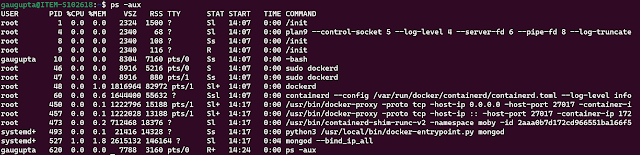
Setup MongoDB community server as a single node. $ docker pull mongodb/mongodb-community-server Verify MongoDB image is downloaded successfully:  $ docker images Run docker image $ docker run --name mongo -p 27017:27017 -d mongodb/mongodb-community-server:latest Setup MongoDB 3 node cluster on docker The steps to create a docker cluster are as follows. Create a Docker network.                $ docker network create mongoCluster Start three instances of MongoDB. docker run -d --rm -p 27017:27017 --name mongo1 --network mongoCluster mongo mongod --replSet myReplicaSet --bind_ip localhost,mongo1 docker run -d --rm -p 27018:27017 --name mongo2 --network mongoCluster mongo mongod --replSet myReplicaSet --bind_ip localhost,mongo2   docker run -d --rm -p 27019:27017 --name mongo3 --network mongoCluster mongo mongod --replSet myReplicaSet --bind_ip localhost,mongo3 Initiate the Replica Set. docker exec -it mongo1 mongosh --eval "r...