Posts

What is makefile and how to use it.

Image
A Makefile is a special file used in Unix and Unix-like operating systems to automate the building and compilation of programs or projects. It contains a set of rules and dependencies that specify how to build a target, typically an executable program or a collection of files. .SILENT : all : first second last # .DEFAULT_GOAL:= last first :     echo "hello world" second :     echo "hello Gaurav" last :     echo "hello world Gaurav"   Refer  here  for more details

Setup Minikube on Windows using WSL

Image
 curl -LO https://storage.googleapis.com/minikube/releases/latest/minikube-linux-amd64 sudo install minikube-linux-amd64 /usr/local/bin/minikube Start a cluster -  minikube start Start second cluster - minikube start -p cluster2 List all minikube cluster running: minikube profile list Set second cluster as current profile- Kubectl: Set kubectl alias to run kubectl commands for minikube if kubectl is not installed locally: alias kubectl = "minikube kubectl --" View kubernetes config: kubectl config view To access minikube from windows command prompt -  Update kube config file as per config on WSL running minikube apiVersion : v1 clusters : - cluster :     certificate-authority : \\wsl.localhost\Ubuntu\home\gaugupta\.minikube\ca.crt     server : https://127.0.0.1:49159   name : cluster2 - cluster :     certificate-authority : \\wsl.localhost\Ubuntu\home\gaugupta\.minikube\ca.crt     server : https://127.0.0.1:49154   name :...

Setup Docker Engine on Windows using WSL2

Image
Steps to setup docker on Windows 10/11 system without installing Docker Desktop application, which is just a GUI for docker. First, you need to install WSL (Windows subsystem for Linux) if not already installed - wsl --install Note: It will install ubuntu linux as default linux flavour. If you need to check and install any other use below command:          wsl --list --online          wsl --install kali-linux Next, install docker using below commands # Add Docker's official GPG key: sudo apt-get update sudo apt-get install ca-certificates curl gnupg sudo install -m 0755 -d /etc/apt/keyrings curl -fsSL https://download.docker.com/linux/ubuntu/gpg | sudo gpg --dearmor -o /etc/apt/keyrings/docker.gpg sudo chmod a+r /etc/apt/keyrings/docker.gpg # Add the repository to Apt sources: echo \   "deb [arch="$(dpkg --print-architecture)" signed-by=/etc/apt/keyrings/docker.gpg] https://download.docker.com/linux/ubuntu \   "$(. /etc/os-rele...

Setup MongoDB on Docker

Image
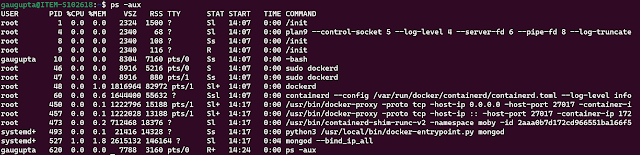
Setup MongoDB community server as a single node. $ docker pull mongodb/mongodb-community-server Verify MongoDB image is downloaded successfully:  $ docker images Run docker image $ docker run --name mongo -p 27017:27017 -d mongodb/mongodb-community-server:latest Setup MongoDB 3 node cluster on docker The steps to create a docker cluster are as follows. Create a Docker network.                $ docker network create mongoCluster Start three instances of MongoDB. docker run -d --rm -p 27017:27017 --name mongo1 --network mongoCluster mongo mongod --replSet myReplicaSet --bind_ip localhost,mongo1 docker run -d --rm -p 27018:27017 --name mongo2 --network mongoCluster mongo mongod --replSet myReplicaSet --bind_ip localhost,mongo2   docker run -d --rm -p 27019:27017 --name mongo3 --network mongoCluster mongo mongod --replSet myReplicaSet --bind_ip localhost,mongo3 Initiate the Replica Set. docker exec -it mongo1 mongosh --eval "r...

OWASP Security

 API Security Broken Object Level Authorization Aka IDOR (In-secured Direct Object Reference) - Accessing unauthorized objects using same token due to lack of authorization checks Mitigation implement authorization checks with user policies and hierarchy dont rely on IDs sent from client. Use IDs from session Check authorization each time there is client request to access database Use random non guessable IDs (UUIDs) Broken Authentication Due to Lack of best practices.  Mitigation Check all possible ways to authenticate to all APIs  Password reset APIs and one-time links also allow users to get authenticated and should be protected just as seriously  Use standard authentication, token generation, password storage, MFA  Use short-lived access tokens  Authenticate your apps (so you know who is talking to you)  OAuth token is not authentication (hotel key analogy) Use stricter rate-limiting for authentication, implement lockout policies and weak password ...

Code Review Best Practices

Some hate it and some love it. It depends on style and intent of code review done by reviewer or understanding of reviewee.  A great code review can reduce overall development cycle by minimizing bug leaks to higher environments and lead to a high-quality final product. On the other hand, poor code reviewing strategy can add unnecessary latencies in development cycle without mitigating any bugs.  What is code review? A manual process of reviewing source code developed by a fellow programmer of a team. It can be performed by multiple people or be performed multiple times by the same person for a thorough analysis. Fews steps can be automated using code analysis tools available. Why do we need code review? The most apparent benefit is making sure bad code is not leaked to production. Other benefits of good code reviews are standardization, knowledge sharing, security checks, and building a sense of teamwork and collaboration. How-to do-good code reviews? There are several aspect...

Detect multiple tabs open in vanilla javascript

<script>      // Broadcast that you're opening a page.      localStorage.openpages = Date.now();      window.addEventListener('storage', function (e) {          if (e.key == "openpages" ) {              // Listen if anybody else is opening the same page!              localStorage.page_available = Date.now();          }          if (e.key == "page_available" ) {              alert( "One more page already open" );          }      }, false ); </script> You might need to read the following steps 2 or 3 times to grab the concept properly. When you open the 1 st ...